
Restaurant POS software made simple!
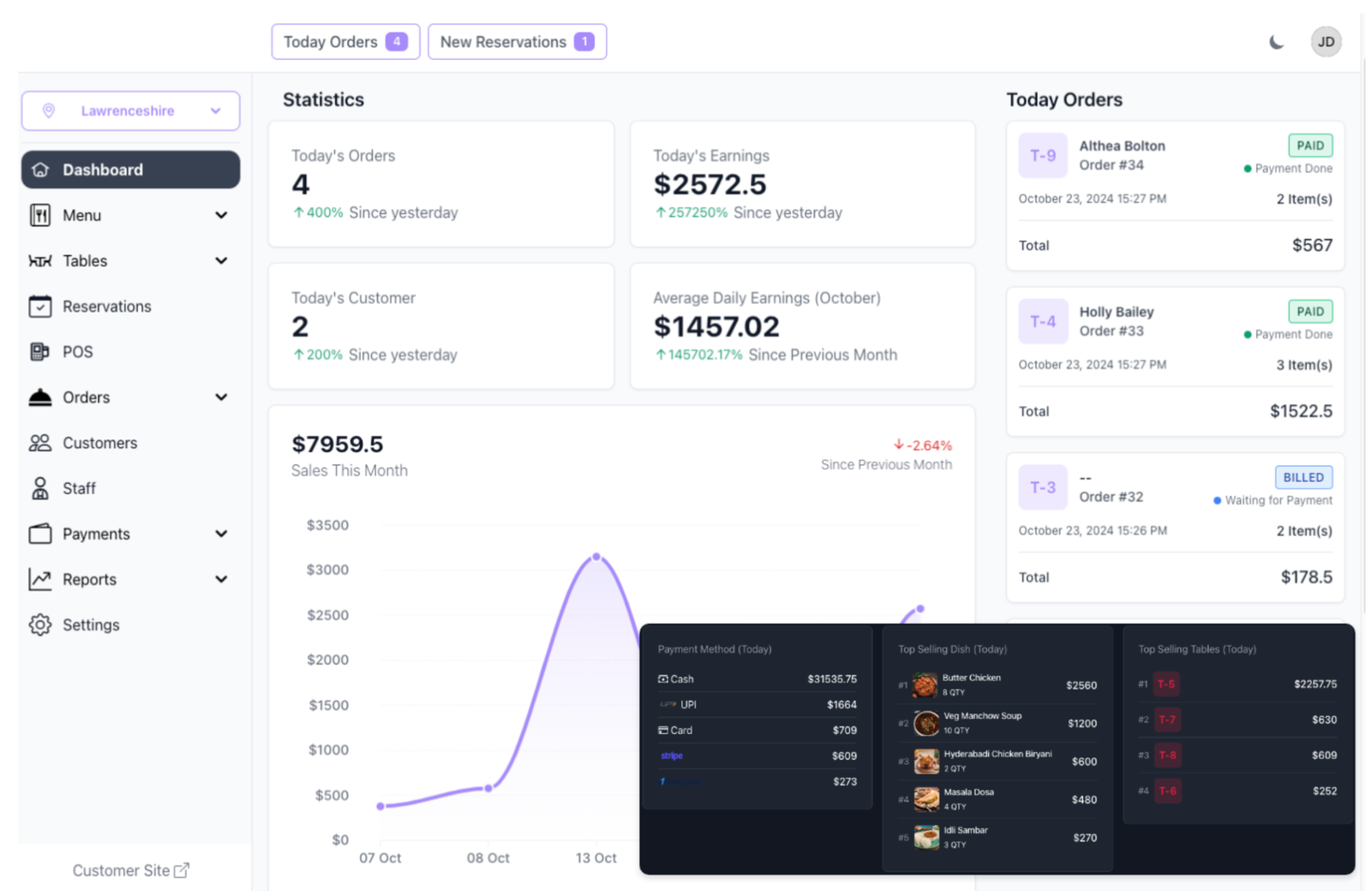
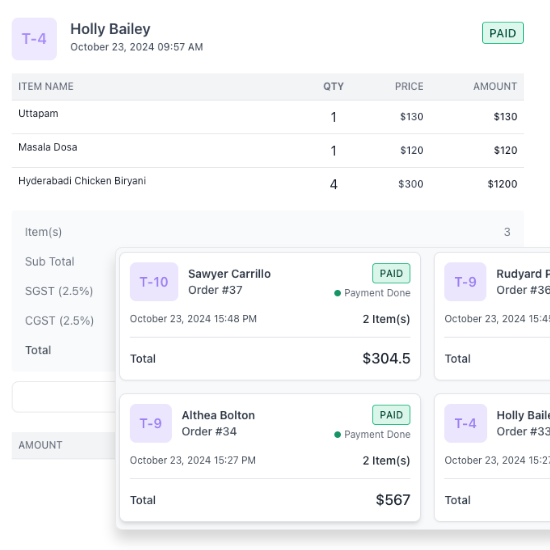
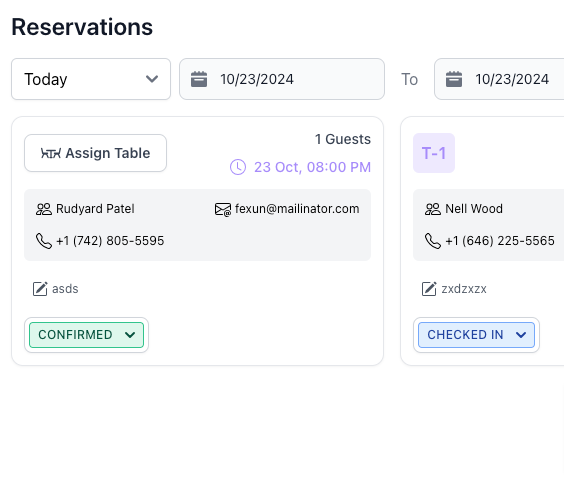
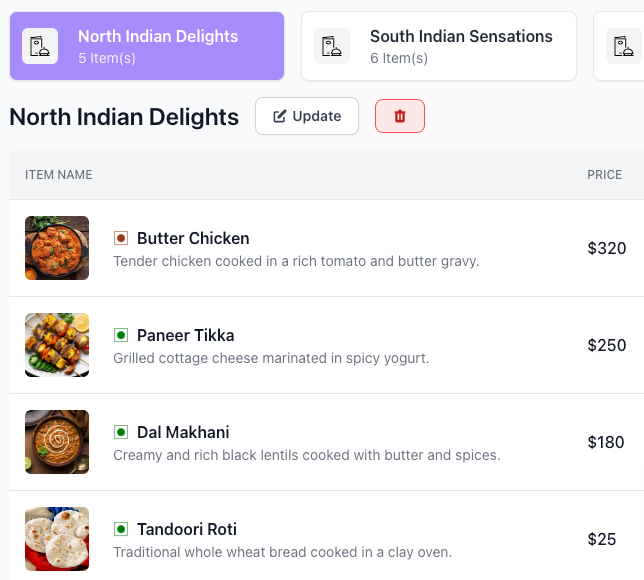
Everything your restaurant needs, in one place
From the first order to the end-of-day report, Dine Pro connects your counter, kitchen and office.
Lightning-fast POS
Bill dine-in, takeaway and delivery from one screen with variations, modifiers, discounts and tips.
KOT & kitchen printing
Tickets print at the right kitchen station the moment an order is placed.
QR table ordering
Guests scan the table QR, browse your menu and order from their own phone.
Tables & floor areas
Live table status by area. Assign, move or merge tables in a tap.
Cash, card & UPI
Split bills, take part payments, track dues, or collect online through 10 gateways.
Table reservations
Staff or guests book online with time slots, party size and status tracking.
Staff roles
Separate logins for admins, branch heads, waiters and chefs, each with their own permissions.
Reports that matter
13 reports: sales, items, categories, tax, expenses, refunds and more. Export anytime.
Take Control of Your Restaurant
Serve faster at every table
Your waiters and cashier work from the same live screen, so orders never get lost between the table and the counter.
- Dine-in, takeaway, delivery and custom order types
- Table view by area with live occupied / free status
- Waiter call requests straight from the guest's table
- Customer display screen showing the running order
A calm, organised kitchen
Every order becomes a kitchen ticket instantly, routed to the right station and printer, with status your front staff can see.
- Automatic KOT on every new order
- Multiple kitchen stations with their own printers
- Track preparing, ready and served in real time
- Removed-item tracking to stop leakage
Close bills in seconds
Print clean GST-style bills with your taxes, split between guests and accept whatever your customer wants to pay with.
- Cash, card, UPI and bank transfer
- Split bills and record part payments or dues
- Inclusive or exclusive tax, discounts and tips
- Online payments via Razorpay, Stripe, PayPal and more
Know your numbers every day
From menu changes to daily sales, manage the whole business, one outlet or many, from a single account.
- Bulk-import your menu from a CSV file
- Expense tracking with summary reports
- Multi-branch control with a branch switcher
- Sales, item, category, tax and payment reports
Made for every kind of food business
Whether you run one café or a chain of restaurants, Dine Pro fits the way you work.
Fine dining
Table management, reservations, waiter call requests and station-wise KOTs.
Quick service & takeaway
Fast counter billing, an order-ready display board and quick payments.
Cafés & bakeries
QR menus, quick modifiers like size and add-ons, and counter billing.
Cloud kitchens
Delivery orders, delivery executives and third-party app order tracking.
Multi-outlet chains
Run every branch from one account with branch-wise reports.
Hotel restaurants
Reservations, multiple dining areas and role-based staff access.
From order to payment in one smooth flow
Take the order
At the POS, by a waiter, or by the guest via table QR.
KOT to kitchen
The ticket prints at the right station instantly.
Serve & track
Table and order status update live for everyone.
Bill & collect
Print the bill, split it and take cash, card or UPI.
See the numbers
Sales, items and tax are ready in your reports.
Works on the devices you already have
No special terminal needed. Open Dine Pro in the browser, or install it as an app, and connect your printers.
Get paid your customers' way
Record every payment mode at the counter, and accept online payments on your QR and ordering site.
Online payment gateways
What Restaurant Owners Are Saying
It has completely transformed how we operate. Managing orders, tables, and staff all from one platform has reduced our workload and made everything run more smoothly.
The QR Code menu and payment integration have made a huge difference for us, especially after the pandemic. Customers love the ease, and we’ve seen faster table turnover.
We are able to track every order in real time, keep our menu updated, and quickly manage payments. It is like having an extra set of hands in the restaurant.
Simple, Transparent Pricing
Subscription Package
This is a subscription package
- Unlimited branches
- Unlimited POS terminals
- Unlimited menu items
- Unlimited orders per day
- Unlimited staff accounts
- 16 of 22 features
Life Time
This is a lifetime access package
- Unlimited branches
- Unlimited POS terminals
- Unlimited menu items
- Unlimited orders per day
- Unlimited staff accounts
- 22 of 22 features
Every new restaurant gets a 30-day free trial. Pick a plan when you're ready.
| Feature | Subscription Package | Life Time |
|---|---|---|
| Menu | ||
| Menu Item | ||
| Item Category | ||
| Area | ||
| Table | ||
| Reservation | ||
| KOT | ||
| Order | ||
| Customer | ||
| Staff | ||
| Report | ||
| Delivery Executive | ||
| Waiter Request | ||
| Expenses | ||
| Payment | ||
| Settings | ||
| Change Branch | ||
| Export Report | ||
| Table Reservation | ||
| Payment Gateway Integration | ||
| Theme Setting | ||
| Customer Display |
Your questions, answered
How can I contact customer support 1?
How can I contact customer support?
How can I contact customer support?
How can I contact customer support?
How can I contact customer support?
How can I contact customer support?
Ready to run a smoother restaurant?
Set up your menu, tables and staff in an afternoon and take your first order the same day.

We're here to help
Talk to our team about plans, setup, printers or moving from your old billing software.